
Overview
The OnPage and Johnson Controls Metasys integration uses Metasys’ native Email Notification feature to deliver alarm notifications to OnPage. When a configured alarm is triggered, Metasys sends an email to an OnPage ID, where it is automatically converted into an OnPage mobile alert and routed to the appropriate on-call responder.
This integration requires no custom development and can be configured using Metasys’ built-in email notification functionality.
How It Works
When a device, piece of equipment, or building system generates an alarm, Metasys evaluates the configured Event Filter for the associated email notification. If the alarm meets the defined criteria, such as alarm priority, equipment type, or status, Metasys generates an email and sends it to an OnPage Group ID or an individual OnPage User ID using the following format:
<GroupID>@onpage.com
When OnPage receives the email, it automatically converts it into an incident alert. OnPage then checks the group’s on-call schedule and immediately delivers the alert to the user who is currently on call. If the alert is not acknowledged within the configured escalation period, OnPage automatically escalates the alert to the next recipient according to the group’s escalation policy.
Prerequisites
Before configuring the integration, ensure the following requirements are met:
· Email notifications are enabled in Metasys.
· SMTP is configured and operational.
· An OnPage account and Group have been created.
· An on-call schedule has been assigned to the OnPage Group.
Configure an Email Notification
1. In Metasys, navigate to Remote Notifications and select the Email tab.
2. Click + Notification to create a new email notification.
3. Configure the following settings:
Label Friendly name for the notification
Priority Alarm severity for the notification
Event Filter Defines which alarms trigger an email notification
Email Address OnPage Group ID or User ID recipients
Configure the Recipient
1. In the Email Addresses field, enter the OnPage ID email address.
Example: [email protected]
2. Using an OnPage Group ID is recommended because alerts are automatically routed to the current on-call user and escalated if they are not acknowledged.

Configure Event Filters
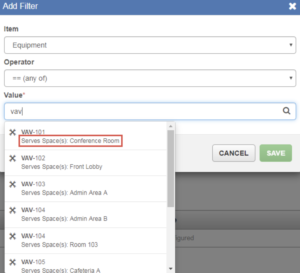
Click + EVENT FILTER on the Create Notification window. The Add Filter dialog box appears, as shown in the following figure.
Example:
Item Equipment
Operator ==
Value VAV-101
Testing the Integration
After saving the notification:
- Use Send Test Email in Metasys.
- Verify the alert is received in the OnPage mobile application.
- Acknowledge the alert to confirm successful delivery.
- If configured, verify the alert escalates when it is not acknowledged.
If the test email fails, review the SMTP configuration and use the Diagnostics page in Metasys to identify any delivery issues.
Best Practices
- Use OnPage Groups instead of individual users whenever possible.
- Configure Event Filters to notify only for actionable alarms.
- Use descriptive notification labels for easy identification.
- Regularly review on-call schedules and escalation policies.
- Periodically test notifications to ensure proper operation.
Summary
The OnPage and Johnson Controls Metasys integration provides a simple and reliable method for delivering critical building automation alarms to the appropriate on-call responders. By leveraging Metasys’ native email notifications and OnPage’s intelligent scheduling and escalation capabilities, organizations can ensure alarms are delivered, acknowledged, and escalated efficiently, improving response times while simplifying on-call management.